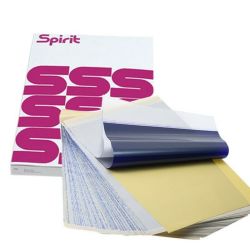

| Brand | Unbranded |
| Manufacturer | Unbranded |
| Model Number | ASH1016 |
What is transfer paper and how do I use it? Transfer paper allows you to trace or stencil images from their original source to the transfer paper, and, eventually, the skin. Transfer paper can be used over any design/image to trace an exact replica. Here is a breakdown of what each part of the 4-ply Paper does: 1st Page - Master Sheet - This white sheet is where your tracing/stencil will transfer to 2nd Page - Protective Tissue - This separates the Master Sheet and Carbon sheet and is typically thrown away after use 3rd Page - Carbon Page - Upon pressing down on the carbon sheet, the carbon will leave behind a black/blue tracing on the following page. 4th Page - Backing Sheet - Holds the Master Sheet in place as it put through a thermal copier.
 Related Products
Loading similar products...
Stay informed about the best deals and price drops. Choose which notifications you'd like to receive from PriceCheck.


